





5000+ Word & Graphics Design Ar Editable File
Original price was: 1,500.00৳ .250.00৳ Current price is: 250.00৳ .
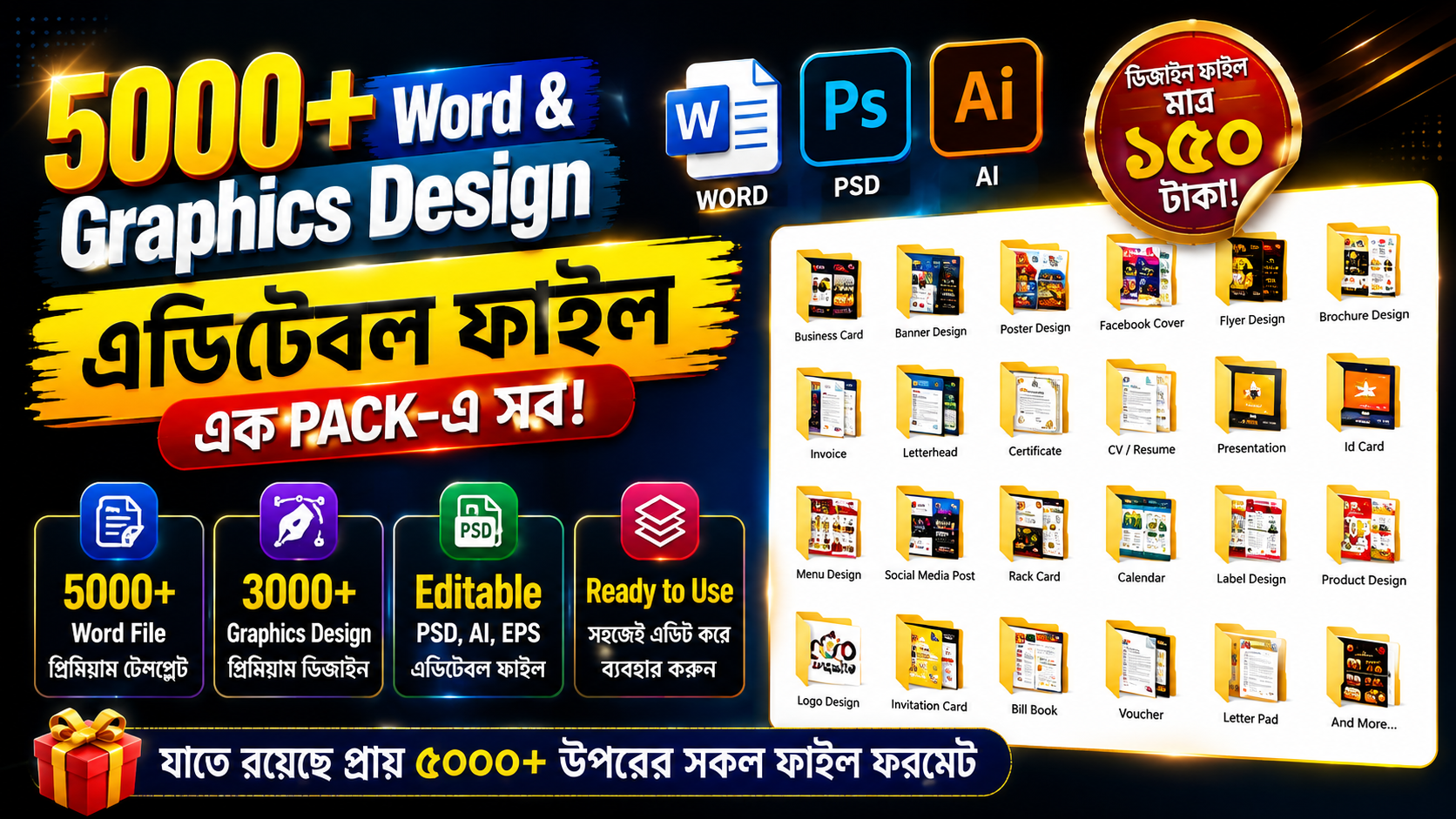
৫০০০+ Word & Graphics Design Editable File Pack (Editable Graphics Design File Collection)
একসাথে পাচ্ছেন ৫০০০+ এর বেশি প্রিমিয়াম Word ও Graphics Design ফাইল। Business Card, Banner, Poster, Flyer, Brochure, CV, Certificate, Invoice, Social Media Post, Logo, ID Card সহ বিভিন্ন ধরনের প্রয়োজনীয় Editable Template থাকছে এই প্যাকেজে।
✅ ৫০০০+ Word File
✅ ৩০০০+ Graphics Design
🔹 PSD, AI, EPS সহ Editable File
✅ Business Card & ID Card
✅ Banner & Poster Design
🔹 Flyer & Brochure
✅ CV / Resume
✅ Invoice & Letterhead
🔹 Certificate & Presentation
✅ Social Media Post
✅ Logo & Invitation Card
🔹 Menu, Voucher, Calendar সহ আরও অনেক ডিজাইন
✅ সহজেই Edit করে নিজের প্রয়োজন অনুযায়ী ব্যবহার করতে পারবেন
🎯 ডিজাইনার, ফ্রিল্যান্সার, ব্যবসায়ী, শিক্ষার্থী ও কনটেন্ট ক্রিয়েটরদের জন্য একটি বিশাল ডিজাইন কালেকশন।
📦 এক প্যাকেজেই হাজার হাজার Editable Design File!
এডিটেবল গ্রাফিক্স ডিজাইন ফাইল নিয়ে আরও জানতে পড়ুন আমাদের Editable Graphics Design File Collection গাইড।
How a large editable collection can be used
A large collection is most useful as a starting point, not as a finished result. A ready Word document gives you a structure, headings, and a layout to adapt. A ready graphics file gives you a composition, spacing, and visual order to change for a particular message. In both cases, the work that matters most is still yours: checking the facts, replacing sample details, and making sure the final version fits the person or business it is for.
For Word documents, start by choosing the type that matches the task, such as a curriculum vitae, an application, a letter, an invoice, or a notice. Read the whole document first. A heading, a date, or a table later in the document may depend on earlier information. Then work on a copy. Keep the original template untouched. Replace names, addresses, dates, amounts, and other personal details. Read the result slowly from start to finish. Before printing or sending it, check spelling, numbers, and page breaks. Use print preview to see whether any text is cut off at the margins.
For graphics files, start with the purpose and the place where the design will be seen. A banner for a shop, a poster for an event, and a post for a small phone screen do not need the same amount of text, size, or layout. Change the main message first, then the name and contact details, and then the smaller details. Check whether the main message can be read quickly and whether the contact information is clear. If a design will be printed, check it at its intended size. If it will be shared on a phone, check it on a phone screen first.
Organizing a large collection so you can find files again
With thousands of files, finding the right file is often the hardest part. Use a simple folder system. Separate Word documents from graphics files, then separate each group by type, such as CVs, letters, invoices, banners, posters, and social media posts. Keep the original templates in one folder that you do not edit directly. Keep the files you are working on in a separate folder. Give each working copy a clear name that includes the type of work and the client or purpose.
It also helps to keep a small folder of the files you use most often. When you adapt a file for a regular type of job, save that adapted version, with sample details removed, as your own working template. Keep a separate backup copy of the original templates and your finished work, in a different place from your main computer if you can. A backup is a habit, not a guarantee. Check from time to time that the backup copies can still be opened.
Checking Bangla text, fonts, and print quality
Bangla text needs a careful check, because a broken conjunct, a shifted matra, or a changed font can change how a word looks and how it is read. If a file looks correct on one computer, do not assume it will look the same on another computer, because the fonts installed on each computer can differ. Test the file on the computer that will be used for the final print or sharing. Check headings, body text, and any text inside images or tables separately. Before printing, check that no sample name or phone number is left in the file.
Checking compatibility before you rely on a file
Compatibility varies by file format, software, and version, so no collection can be described as editable in every program. The product page lists PSD, AI, and EPS among its editable graphics formats. That list is the product page’s list, not an independently verified list. Check the current product page for the current list before ordering. Word files and graphics files need different kinds of software. A newer or older version of a program can display fonts, spacing, or layers differently. Before an important job, open a copy in the software and version you will actually use. Confirm that the text, images, and layout behave as you expect.
What to check before ordering
Because a collection like this contains many files, confirm the details that matter to you in writing before you order, rather than assuming them from a title or a short list. Ask the seller to confirm, in writing, the current list of files and formats, the current price and what is included in it, how the files will be provided, and the licence terms for your intended use. Licence terms and your own purpose decide whether a file may be used for personal work, client work, or another purpose. A download or a template does not by itself make every use permitted. Keep a copy of the order details and any written confirmation.
Also confirm, in writing, which software and version you will need, whether any file needs a font that is not on your computer, and who to contact if a file does not open. If a time saving is mentioned anywhere, treat it as a hypothetical illustration only, not a promise. The time a job takes depends on how complex it is, how ready your information is, and how much checking the final version needs. Check the current product page again just before ordering, because file lists, formats, and other details can change over time.
Helpful references
For Word basics, see Microsoft Word help and learning. For Photoshop file formats, see Adobe Help: Supported file formats in Photoshop. These pages are official help sources for their own software. They do not verify the contents of this collection, and they do not replace the checks described above.
Only logged in customers who have purchased this product may leave a review.






Reviews
There are no reviews yet.